

What are Meta Tags?
Meta tags are the short, clickable headlines you see in Google Search results. The meta title and description are there to tell users what your page is about and what they can expect.
This is an example of a meta title.

This is an example of a meta description.

They are the first impression of your page. It decides if the user will click on your page or scroll past it. Apart from the user, well-written meta tags ensure search engines understand your page’s content better.
Why are Meta Tags important?
Writing a strong, attention-pulling meta title and description helps you improve your click-through rate. With the right words, your page can stand out in the search results.
For example, this title and description is great. The meta tiel says what they specialize in and the description add the “FREE UK Shipping over £50” part. Free shipping stands out in the description which can give the final push to check out their football shirts.

If you have no meta tags or description, Google will provide one itself. However, it will be less attention-grabbing or attractive to users to actually visit your page.
How to add a meta title and description in WordPress?
Now it’s time to actually add the meta title and description in WordPress for each page. I use the Rank Math plugin to help me with this task.
The first step is to install the plugin. Go to the ‘Add Plugin’ section in WordPress.

Search for ‘Rank Math’ and press ‘Install’. Then click ‘Activate’.

To actually add a meta title and description to certain pages of your website, go to your blog posts, ‘Posts’ in the sidebar.

Click on ‘Edit’ below the post.

Click on the Rank Math symbol in the right corner of the page.

Then click on ‘Edit Snippet’.

Here you can add your meta title and description. When you’re done you can just press the exit button in the right corner of the window.

Other Plugins to add a Meta Title and Description in WordPress
As I already mentioned, I use the Rank Math plugin to help me with the meta titles and descriptions of my pages. However, there are more plugins that are amazing alternatives for this task.
Yoast SEO
Yoast SEO is one of the most trusted and popular tools to improve SEO for WordPress users. Yoast SEO is very beginner-friendly to use.
Once you have installed the plugin, it adds a simple SEO box to your post editor, where you can easily add your meta title and description. You’ll also see a little snippet preview showing how your page will appear in the Google search results.
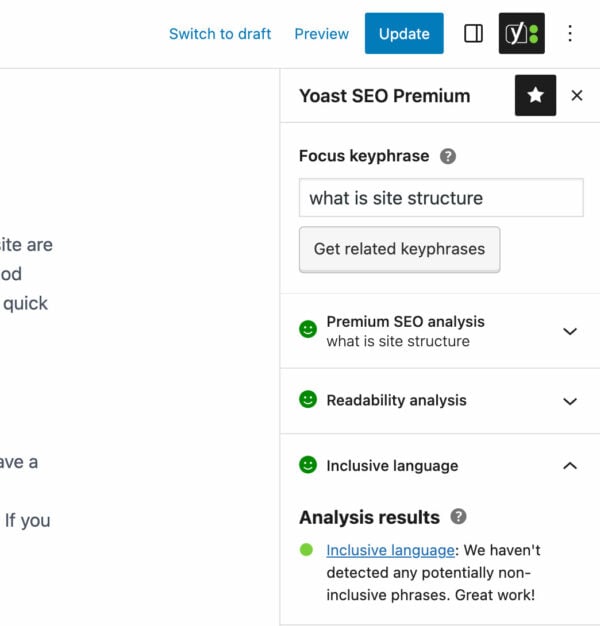
You can change your SEO settings with Yoast SEO per page, to make sure every page is optimized. It uses color-coded indicators (green, orange, and red) to show how SEO-proof your page is.
Benefits of Yoast SEO:
- Clean and user-friendly interface perfect for beginners.
- Real-time SEO analysis with easy-to-follow recommendations.
- Readability check to help you write clear, engaging content.
- Automatic meta generation if you forget to add one manually.
- Integration with tools like Google Search Console for performance insights.
Yoast SEO is especially helpful for bloggers, small business owners, and freelancers who want an all-in-one solution to improve how their pages appear in search engines.
All in One SEO (AIOSEO)
The All in One SEO plugin has a slightly different focus. It’s great for users who like automation, but still want to remain in control of their SEO strategy.
It offers a modern, but beginner-friendly interface that helps you add and change your own meta titles and descriptions for any page or post. You also have access to advanced features like schema markup, which helps search engines understand your content’s context better.
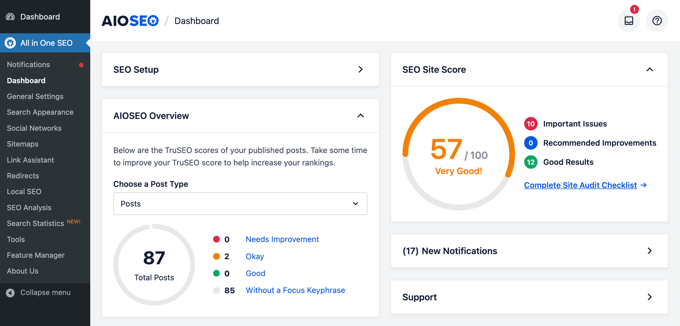
You can also install automations to help you save time with this tool. For example, you can set global rules for titles and descriptions so that newly published pages and posts will have a basic SEO setup. You can later change these individually when needed.
Benefits of All in One SEO (AIOSEO):
- Intuitive setup wizard that guides you from installation to optimization.
- Smart meta tag templates for faster SEO management.
- Built-in schema support for better search result appearance.
- Role-based access to control who can edit SEO settings.
- Seamless integration with WooCommerce and other plugins.
AIOSEO is ideal if you’re managing a larger site or eCommerce store and want more flexibility than what most basic SEO tools offer. It balances automation and control beautifully, letting you scale your SEO efforts as your site grows.